NPI Vantage User Guide
This guide covers the Vantage Portal home page and primary navigation — your entry point for exploring upcoming spend and accessing the rest of the platform.
Please Note: Access to some of the capabilities described in this guide is dependent on user permission level. Users with Read-Only access can view deal data in the platform but cannot make edits or submit deals for review.
Primary Navigation
From the Vantage Portal home page you can access the following: Home, NPI Account, Resources, and Blog.

These items are always available along the top of every page in Vantage.
The Home Page
At the top of the home page you'll find interactive graphical representations of upcoming spend by supplier, category, and contract type. These graphs can be downloaded for internal use by clicking the hamburger menu in the top right corner of each chart.
You can additionally drill down on specific suppliers in the spend tree to see a list of contracts associated with that supplier and their details — including TCV, time remaining, and renewal status.
Drilling Into a Supplier
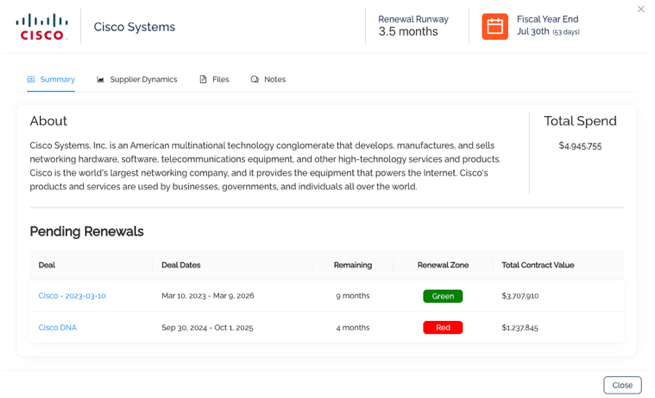
Clicking a supplier opens a summary card with key metrics, pending renewals, and a Total Spend rollup. You can also drill further down to see deal details by clicking on the deal name.
Was this article helpful?
That’s Great!
Thank you for your feedback
Sorry! We couldn't be helpful
Thank you for your feedback
Feedback sent
We appreciate your effort and will try to fix the article