Home Dashboard & Navigation
NPI Vantage Pro User Guide
This guide covers how to navigate the NPI Vantage Pro user interface from the homepage, including the primary navigation bar and the Home dashboard.
Please Note: Access to some of the capabilities described in this guide is dependent on user permission level. Users with Read-Only access can view deal data in the platform but cannot make edits or submit deals for review.
Primary Navigation
From the Vantage Pro homepage you can access the following: Home, Smart Calendar, Supplier Dynamics, NPI Account, Resources, and Blog.

These items are always available along the top of every page in Vantage Pro.
The Home Dashboard
The Home dashboard contains the Focus Board for upcoming renewals that are in the red zone, a My Tasks section, and additional navigation on the right-hand side of the screen.
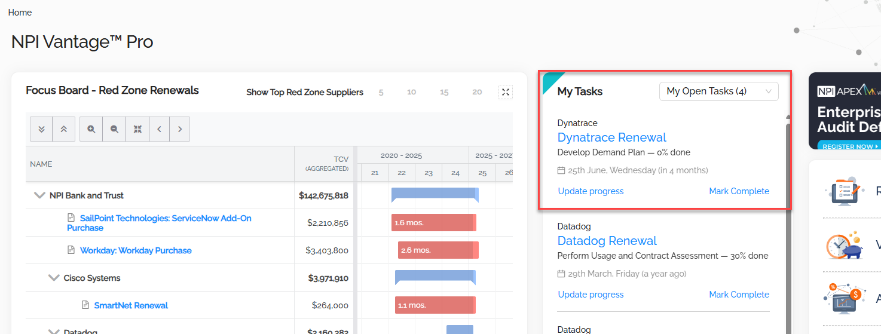
The dashboard highlights:
- Focus Board — Red Zone Renewals: A list of your top red-zone suppliers, showing renewals expiring soon with aggregated TCV.
- My Tasks: Assign renewal tasks and track progress for any open tasks assigned to you.
- Right-hand navigation: Rotating educational opportunities and quick-access buttons for Request A Benchmark Report, View All Submitted Deals, Access Supplier Dynamics, and NPI Resources.
- Guided Tours tab: A tab on the right edge of the screen opens quick video tours of Vantage features.
Upcoming Spend Visualizations
Scrolling down the Home page you will find interactive graphical representations of upcoming spend by supplier. If your Vantage Administrator has configured categories for your organization, you will also be able to view spend by category. These graphs can be sorted by different levels of spend (Top 5, Top 10, Top 25).
Downloading the chart
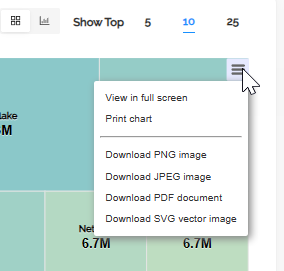
Graphs can be downloaded for internal use by clicking the hamburger menu on the top right corner of the chart. Options include:
- View in full screen
- Print chart
- Download PNG image
- Download JPEG image
- Download PDF document
- Download SVG vector image
Was this article helpful?
That’s Great!
Thank you for your feedback
Sorry! We couldn't be helpful
Thank you for your feedback
Feedback sent
We appreciate your effort and will try to fix the article