Notifications & Custom Runway
NPI Vantage Pro User Guide
Vantage Pro uses a runway model to warn you about renewals before they become urgent. This guide covers how to configure a custom runway for a deal and how to use renewal reminders from the Smart Calendar.
What is Runway?
Runway is the lead time NPI uses to flag an upcoming renewal. By default, a deal moves into your red zone when it reaches the runway threshold — triggering dashboard callouts, email alerts, and Focus Board prioritization.
A Custom Runway lets you override the default threshold on a per-deal basis, which is useful for:
- Strategic renewals that need extra runway (e.g., 12+ months for a large EA)
- Fast-moving deals that don't need the full default window
- Aligning the red zone with your organization's budget cycle
Setting a Custom Runway
Open any deal from the Smart Calendar or Home dashboard and click the Set Custom Runway button on the deal header.
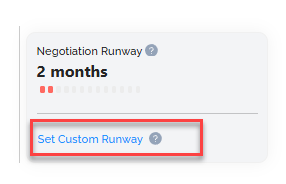
Add Custom Runway Dialog
In the Add Custom Runway dialog, specify how far in advance of the renewal date the deal should enter the red zone.
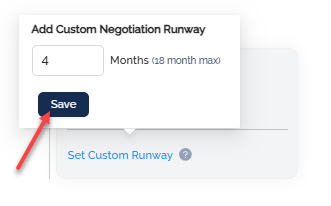
Click Save to apply. The deal will now use your custom runway instead of the organization default.
Confirming the Saved Runway
Once saved, the deal's runway is visible on the Deal Overview and on the Smart Calendar.
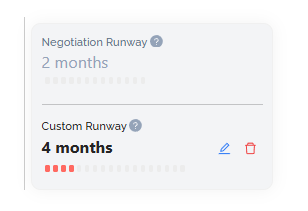
You can edit or remove a custom runway at any time by reopening the dialog.
Renewal Reminders from the Smart Calendar
The Smart Calendar surfaces an alert bell on each row as renewals approach. The bell turns active when the deal has entered its runway window.

Click the bell to open the Renewal Reminder dialog for that deal.
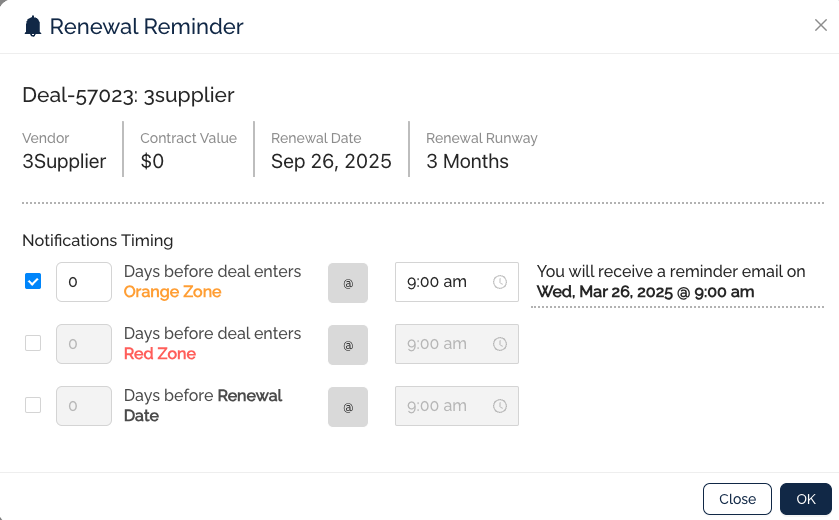
From the Renewal Reminder dialog you can:
- Review the renewal date and current runway
- Set a reminder date for yourself or a teammate
- Add notes that carry onto the deal's Notes/Messages tab
Primary and Secondary Contacts on a deal receive system-generated email alerts automatically as the deal moves through runway thresholds.
Was this article helpful?
That’s Great!
Thank you for your feedback
Sorry! We couldn't be helpful
Thank you for your feedback
Feedback sent
We appreciate your effort and will try to fix the article